How experienced developers, architects, and technical leaders use AI as a strategic force multiplier — not a replacement for thinking.
The Paradigm Shift: AI as Leverage, Not Crutch
AI coding assistants have fundamentally transformed software development, but the revolution isn’t what most people expect. For senior developers, architects, and engineering leaders, AI isn’t about writing code faster or avoiding difficult problems. It’s about strategic leverage.
The distinction is critical:
Juniors use AI to avoid thinking.
Seniors use AI to think better.
This playbook reveals how experienced engineers actually integrate AI into their workflows, with practical prompts, real code examples, and battle-tested strategies for React, TypeScript, and modern frontend architectures.
The Core Principle: Amplification, Not Replacement
Experience Level × AI = Output Quality
Junior (Low Experience) × AI = Amplified Mistakes
Senior (High Experience) × AI = Amplified Impact
The Iron Rule: AI augments judgment — it doesn’t create it. Without fundamentals, AI becomes dangerous. With expertise, it becomes transformative.
1. Architecture & System Design: The Strategic Layer
When Senior Engineers Use AI for Architecture
Senior developers don’t ask AI to design systems. They use it to:
- Challenge their assumptions before committing to an approach
- Explore alternative patterns they might have overlooked
- Document decisions with AI-generated RFC summaries
- Evaluate technical debt against modern standards
Master Prompt: Architecture Review
Real-World Example: Feature Flag Architecture
Act as a Staff Frontend Engineer with 10+ years of experience.Review this React + TypeScript architecture for:
- Scalability bottlenecks
- Testing strategy gaps
- Long-term maintainability concerns
- Performance considerationsARCHITECTURE:
[Your architecture description or diagram]Provide:
1. Risk assessment (HIGH/MEDIUM/LOW for each risk)
2. Trade-off analysis
3. Three alternative approaches with pros/cons
4. Recommended next steps
Scenario: You’re designing a feature flag system for a React application.
// Initial approach - needs review
interface FeatureFlags {
  newCheckout: boolean;
  darkMode: boolean;
  experimentalUI: boolean;
}

const FeatureFlagProvider: React.FC = ({ children }) => {
  const [flags, setFlags] = useState<FeatureFlags>({
    newCheckout: false,
    darkMode: false,
    experimentalUI: false
  });
  useEffect(() => {
    fetch('/api/flags').then(res => res.json()).then(setFlags);
  }, []);
  return (
    <FlagContext.Provider value={flags}>
      {children}
    </FlagContext.Provider>
  );
};
AI Analysis Request:
Review this feature flag implementation. Consider:
- Type safety for new flags
- Performance with many flags
- Testing strategy
- Rollout safety
- A/B testing capability
AI Response Reveals: Missing flag validation, no loading states, no error boundaries, type system won’t catch new flags, and no gradual rollout mechanism.
Improved Implementation:
// AI-informed improvement
type FlagKey = 'newCheckout' | 'darkMode' | 'experimentalUI';

interface FeatureFlag {
  enabled: boolean;
  rolloutPercentage?: number;
  dependencies?: FlagKey[];
}

type FeatureFlags = Record<FlagKey, FeatureFlag>;

interface FlagContextValue {
  flags: FeatureFlags;
  isLoading: boolean;
  error: Error | null;
  isEnabled: (key: FlagKey) => boolean;
}

const FeatureFlagProvider: React.FC = ({ children }) => {
  const [state, setState] = useState<{
    flags: FeatureFlags;
    isLoading: boolean;
    error: Error | null;
  }>({
    flags: {} as FeatureFlags,
    isLoading: true,
    error: null
  });

  useEffect(() => {
    fetch('/api/flags')
      .then(res => res.json())
      .then(flags => setState({ flags, isLoading: false, error: null }))
      .catch(error => setState(prev => ({
        ...prev,
        isLoading: false,
        error
      })));
  }, []);

  const isEnabled = useCallback((key: FlagKey): boolean => {
    const flag = state.flags[key];
    if (!flag) return false;

    // Check dependencies
    if (flag.dependencies?.some(dep => !isEnabled(dep))) {
      return false;
    }

    // Check rollout percentage
    if (flag.rolloutPercentage) {
      const userId = getUserId(); // Get stable user ID
      const hash = simpleHash(userId + key);
      return (hash % 100) < flag.rolloutPercentage;
    }

    return flag.enabled;
  }, [state.flags]);

  return (
    <FlagContext.Provider value={{ ...state, isEnabled }}>
      {children}
    </FlagContext.Provider>
  );
};
Key Insight: AI didn’t write this code — it revealed the gaps in the original design. The senior developer made the architectural decisions.
2. AI-Assisted Code Reviews: Beyond Syntax Checking
What Seniors Review (That Juniors Miss)
Junior Focus          Senior Focus
├─ Syntax            ├─ Readability
├─ Basic bugs        ├─ Edge cases
└─ Style guide       ├─ Performance implications
                     ├─ Future maintenance burden
                     ├─ Team conventions
                     └─ System-wide impact
Master Prompt: Senior-Level PR Review
Review this pull request as a senior engineer.

CODE:
[paste PR diff]

Focus on:
1. Naming clarity and intent
2. Edge cases and error handling
3. Long-term maintainability
4. Performance implications
5. Testing gaps
6. Breaking changes or migration needs

Provide constructive, actionable feedback ranked by priority.
Pro Strategy: Pre-Review Before Submission
// Before submitting PR, ask AI:
const preReviewPrompt = `
Review this code I'm about to submit:

${codeDiff}

What would a senior engineer flag?
What tests am I missing?
What edge cases haven't I considered?
`;
This dramatically improves PR quality and reduces back-and-forth with reviewers.
3. Performance Optimization: From Symptom to Root Cause
The Senior Approach to Performance
AI finds symptoms. You diagnose root causes.
Master Prompt: Performance Audit
Analyze this React component for performance issues.

COMPONENT:
[paste component code]

USER CONTEXT:
- Component renders in a list of 500+ items
- Users report lag when scrolling
- Re-renders seem frequent

Identify:
1. Unnecessary re-renders
2. Expensive operations in render path
3. Missing memoization opportunities
4. Memory leaks

Suggest optimizations with reasoning.
Real Example: Dashboard Performance Issue
Problem Code:
const Dashboard: React.FC = () => {
  const [data, setData] = useState<DashboardData[]>([]);

  // This runs on every render!
  const processedData = data.map(item => ({
    ...item,
    formattedDate: formatDate(item.date),
    metrics: calculateMetrics(item),
    trend: analyzeTrend(item.history)
  }));

  const filteredData = processedData.filter(item =>
    item.status === 'active'
  );

  return (
    <div>
      {filteredData.map(item => (
        <DashboardCard key={item.id} data={item} />
      ))}
    </div>
  );
};
AI Analysis Reveals:
- Expensive computations run on every render
- No memoization
- Array operations create new references
- Child components re-render unnecessarily
Senior-Optimized Solution:
const Dashboard: React.FC = () => {
  const [data, setData] = useState<DashboardData[]>([]);

  // Memoize expensive processing
  const processedData = useMemo(
    () => data.map(item => ({
      ...item,
      formattedDate: formatDate(item.date),
      metrics: calculateMetrics(item),
      trend: analyzeTrend(item.history)
    })),
    [data] // Only recalculate when data changes
  );

  // Memoize filtering
  const filteredData = useMemo(
    () => processedData.filter(item => item.status === 'active'),
    [processedData]
  );

  return (
    <div>
      {filteredData.map(item => (
        <MemoizedDashboardCard key={item.id} data={item} />
      ))}
    </div>
  );
};
4. Legacy Code Refactoring: The Senior’s Battlefield
Legacy code is where senior developers prove their value. AI can accelerate refactoring, but only with proper strategy.
Master Prompt: Safe Refactor
Refactor this legacy React class component to modern hooks.

REQUIREMENTS:
- Preserve exact behavior
- Explain each transformation
- Highlight any behavior that might change
- Suggest test cases to verify equivalence

LEGACY CODE:
[paste class component]
The Senior Refactoring Process
1. AI generates refactor  →  Don't trust it yet
2. Review each change     →  Verify behavior preservation
3. Write tests first      →  AI can help generate tests
4. Refactor incrementally →  Small, verifiable steps
5. Manual validation      →  Run through all scenarios
Example: Class to Hooks Migration
Legacy Class Component:
class UserProfile extends React.Component<Props, State> {
  state = {
    user: null,
    loading: true,
    error: null
  };

  componentDidMount() {
    this.fetchUser();
  }

  componentDidUpdate(prevProps: Props) {
    if (prevProps.userId !== this.props.userId) {
      this.fetchUser();
    }
  }

  fetchUser = async () => {
    this.setState({ loading: true, error: null });
    try {
      const user = await api.getUser(this.props.userId);
      this.setState({ user, loading: false });
    } catch (error) {
      this.setState({ error, loading: false });
    }
  };

  render() {
    const { user, loading, error } = this.state;
    if (loading) return <Spinner />;
    if (error) return <Error error={error} />;
    return <UserCard user={user} />;
  }
}
AI-Assisted Modern Version:
const UserProfile: React.FC<Props> = ({ userId }) => {
  const [user, setUser] = useState<User | null>(null);
  const [loading, setLoading] = useState(true);
  const [error, setError] = useState<Error | null>(null);

  // Consolidated fetch logic
  useEffect(() => {
    let cancelled = false; // Prevent state updates after unmount

    const fetchUser = async () => {
      setLoading(true);
      setError(null);

      try {
        const userData = await api.getUser(userId);
        if (!cancelled) {
          setUser(userData);
          setLoading(false);
        }
      } catch (err) {
        if (!cancelled) {
          setError(err as Error);
          setLoading(false);
        }
      }
    };

    fetchUser();

    return () => {
      cancelled = true; // Cleanup
    };
  }, [userId]); // Re-fetch when userId changes

  if (loading) return <Spinner />;
  if (error) return <Error error={error} />;
  return <UserCard user={user} />;
};
Senior Validation Checklist:
- ✅ Cleanup function added (AI might miss this)
- ✅ Dependency array correct
- ✅ Race condition handled
- ✅ Behavior identical to original
- ✅ Tests pass
5. TypeScript as a Senior Safety Net
Senior developers use TypeScript not just for autocomplete, but to encode business rules and prevent entire classes of bugs.
Master Prompt: Type Safety Upgrade
Improve type safety in this code.

CODE:
[paste code with 'any' types or loose typing]

Requirements:
- Eliminate 'any' types
- Introduce generics where appropriate
- Use discriminated unions for state
- Explain how each type improvement prevents bugs
Example: Payment Flow Type Safety
Weak Types (Junior Approach):
interface PaymentState {
  status: string;
  amount?: number;
  error?: string;
  transactionId?: string;
}

const processPayment = (data: any) => {
  // Runtime checks everywhere
  if (!data.amount) throw new Error('Amount required');
  // ... more runtime validation
};
Strong Types (Senior Approach):
// Discriminated union encodes state machine
type PaymentState =
  | { status: 'idle' }
  | { status: 'processing'; amount: number }
  | { status: 'success'; transactionId: string; amount: number }
  | { status: 'failed'; error: Error; amount: number };

// Type-safe payment data
interface PaymentData {
  amount: number;
  currency: 'USD' | 'EUR' | 'GBP';
  method: PaymentMethod;
}

// Generic result type
type Result<T, E = Error> =
  | { success: true; data: T }
  | { success: false; error: E };

const processPayment = async (
  data: PaymentData
): Promise<Result<{ transactionId: string }>> => {
  // TypeScript guarantees all required fields exist
  try {
    const response = await api.charge(data);
    return { success: true, data: { transactionId: response.id } };
  } catch (error) {
    return { success: false, error: error as Error };
  }
};

// Usage - compiler forces handling all cases
const handlePayment = async (data: PaymentData) => {
  const result = await processPayment(data);

  if (result.success) {
    // TypeScript knows transactionId exists here
    console.log(`Success: ${result.data.transactionId}`);
  } else {
    // TypeScript knows error exists here
    console.error(`Failed: ${result.error.message}`);
  }
};
Senior Insight: If AI struggles to add proper types to your code, it’s often a signal that your abstractions aren’t clear.
6. Testing Strategy: What to Test, Not Just How
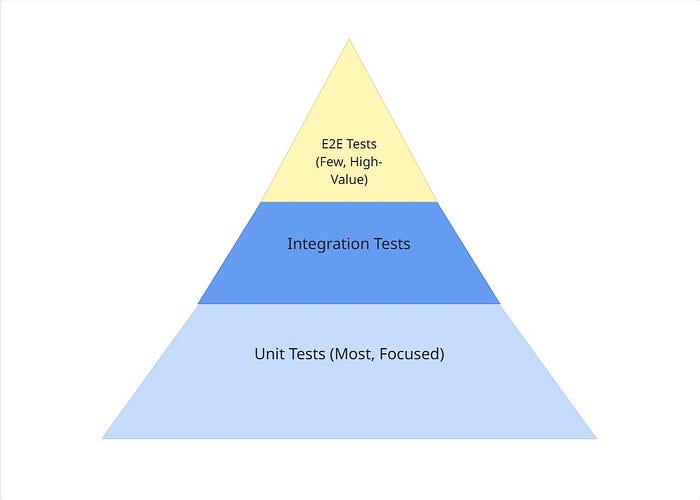
The Senior Testing Pyramid
Master Prompt: Test Strategy
Act as a QA-minded senior engineer.

CODE:
[paste feature code]

Identify:
1. Missing test scenarios
2. Critical edge cases
3. Integration points
4. Failure modes

Suggest specific test cases with examples.
Prioritize by risk level.
Example: Shopping Cart Test Strategy
Feature Code:
class ShoppingCart {
  private items: CartItem[] = [];

  addItem(product: Product, quantity: number): void {
    const existing = this.items.find(i => i.productId === product.id);

    if (existing) {
      existing.quantity += quantity;
    } else {
      this.items.push({
        productId: product.id,
        quantity,
        price: product.price
      });
    }
  }

  calculateTotal(): number {
    return this.items.reduce(
      (sum, item) => sum + (item.price * item.quantity),
      0
    );
  }

  applyDiscount(code: string): number {
    // Apply discount logic
  }
}
AI Test Strategy Analysis:
describe('ShoppingCart', () => {
  // HIGH PRIORITY - Business Critical
  describe('calculateTotal', () => {
    it('calculates total for single item', () => {
      const cart = new ShoppingCart();
      cart.addItem({ id: '1', price: 10 }, 2);
      expect(cart.calculateTotal()).toBe(20);
    });

    it('calculates total for multiple items', () => {
      const cart = new ShoppingCart();
      cart.addItem({ id: '1', price: 10 }, 2);
      cart.addItem({ id: '2', price: 5 }, 3);
      expect(cart.calculateTotal()).toBe(35);
    });

    // EDGE CASE - AI suggested this
    it('handles floating point precision', () => {
      const cart = new ShoppingCart();
      cart.addItem({ id: '1', price: 0.1 }, 3);
      expect(cart.calculateTotal()).toBe(0.3);
    });

    // EDGE CASE - Critical for empty state
    it('returns 0 for empty cart', () => {
      const cart = new ShoppingCart();
      expect(cart.calculateTotal()).toBe(0);
    });
  });

  // HIGH PRIORITY - Data Integrity
  describe('addItem', () => {
    it('combines quantities for duplicate products', () => {
      const cart = new ShoppingCart();
      const product = { id: '1', price: 10 };

      cart.addItem(product, 2);
      cart.addItem(product, 3);

      expect(cart.calculateTotal()).toBe(50); // 5 items × $10
    });

    // EDGE CASE - AI flagged this
    it('handles zero quantity', () => {
      const cart = new ShoppingCart();
      cart.addItem({ id: '1', price: 10 }, 0);
      expect(cart.calculateTotal()).toBe(0);
    });

    // EDGE CASE - Negative quantity
    it('handles negative quantity appropriately', () => {
      const cart = new ShoppingCart();
      expect(() => {
        cart.addItem({ id: '1', price: 10 }, -1);
      }).toThrow('Quantity must be positive');
    });
  });

  // MEDIUM PRIORITY - Feature Correctness
  describe('applyDiscount', () => {
    it('applies valid discount code', () => {
      // AI suggests discount scenarios
    });

    it('rejects invalid discount code', () => {
      // AI suggests validation scenarios
    });

    it('applies discount only once', () => {
      // AI catches double-discount bug
    });
  });
});
Senior Rule: AI writes tests fast. You decide what matters.
7. Decision Making: AI as Your Second Brain
Senior engineers make decisions considering cost, risk, team velocity, and long-term maintenance — not just technical elegance.
Master Prompt: Decision Analysis
Compare these two implementation approaches for [FEATURE].

APPROACH A:
[description]

APPROACH B:
[description]

Analyze trade-offs:
1. Implementation complexity
2. Performance characteristics
3. Developer experience
4. Long-term maintenance cost
5. Team skill requirements
6. Testing difficulty

Recommend one with justification.
Consider we have a team of 5 mid-level engineers
and need to ship in 3 weeks.
Example: State Management Decision
Decision: Choose between Redux Toolkit vs. Zustand for new feature
// Approach A: Redux Toolkit
const userSlice = createSlice({
  name: 'user',
  initialState: { data: null, loading: false },
  reducers: {
    setUser: (state, action) => {
      state.data = action.payload;
    }
  },
  extraReducers: (builder) => {
    builder
      .addCase(fetchUser.pending, (state) => {
        state.loading = true;
      })
      .addCase(fetchUser.fulfilled, (state, action) => {
        state.data = action.payload;
        state.loading = false;
      });
  }
});

// Approach B: Zustand
const useUserStore = create((set) => ({
  user: null,
  loading: false,
  fetchUser: async (id) => {
    set({ loading: true });
    const user = await api.getUser(id);
    set({ user, loading: false });
  }
}));
AI Decision Framework Output:
RECOMMENDATION: Zustand (Approach B)

REASONING:
1. Implementation: 40% less boilerplate
2. Team velocity: Easier learning curve
3. Debugging: Simpler mental model
4. Performance: Comparable for your scale
5. Risk: Lower migration cost if needs change

WHEN Redux Toolkit is better:
- Complex state interactions
- Time-travel debugging needed
- Large team standardization
- Existing Redux ecosystem

YOUR CONTEXT favors Zustand:
- Small team (5 engineers)
- Tight deadline (3 weeks)
- Feature-specific state
- Mid-level team
Senior Insight: AI helps you think broader, not deeper. The final call is yours.
8. Mentorship at Scale: Multiply Your Impact
One senior developer can mentor many with AI assistance.
Master Prompt: Mentorship
Explain this code to a junior developer.

CODE:
[paste complex code]

Requirements:
- Use simple language
- Provide real-world analogies
- Explain "why" not just "what"
- Highlight common pitfalls
- Suggest improvements for learning
Example: Explaining Closures
Complex Code:
function createCounter() {
  let count = 0;
  return {
    increment: () => ++count,
    decrement: () => --count,
    getCount: () => count
  };
}
AI-Generated Junior Explanation:
“Think of
createCounterlike a vending machine factory. When you call the factory, it builds a new machine with its own private coin counter inside.The
countvariable is like coins locked inside the machine—no one can reach in and touch them directly. The only way to interact is through the buttons (increment, decrement, getCount).This is called a closure — the inner functions ‘remember’ the
countvariable even aftercreateCounterfinishes running. Each machine has its own private counter.”
This scales your mentorship impact beyond 1:1 meetings.
9. The Senior’s AI Tooling Stack
Daily Workflow Integration
Development Phase          Tool
─────────────────────────────────────────────
Architecture              → ChatGPT / Claude
Code Writing              → GitHub Copilot
Code Review               → ChatGPT + Manual
Large Codebase Search     → Sourcegraph Cody
Test Generation           → CodiumAI
Security Scanning         → Snyk AI
Performance Monitoring    → Lighthouse + AI Analysis
Documentation             → ChatGPT
Mentorship                → ChatGPT
Example Workflow: New Feature Development
1. Architecture Planning
   ├─ AI: Generate 3 approaches
   ├─ Senior: Evaluate trade-offs
   └─ AI: Draft RFC document

2. Implementation
   ├─ Copilot: Accelerate boilerplate
   ├─ Senior: Review each suggestion
   └─ AI: Explain complex libraries

3. Testing
   ├─ AI: Generate test cases
   ├─ Senior: Prioritize by risk
   └─ AI: Generate test code

4. Review
   ├─ AI: Pre-review before PR
   ├─ Senior: Manual verification
   └─ Team: Human review

5. Documentation
   ├─ AI: Generate initial docs
   ├─ Senior: Add context & decisions
   └─ AI: Format for team wiki
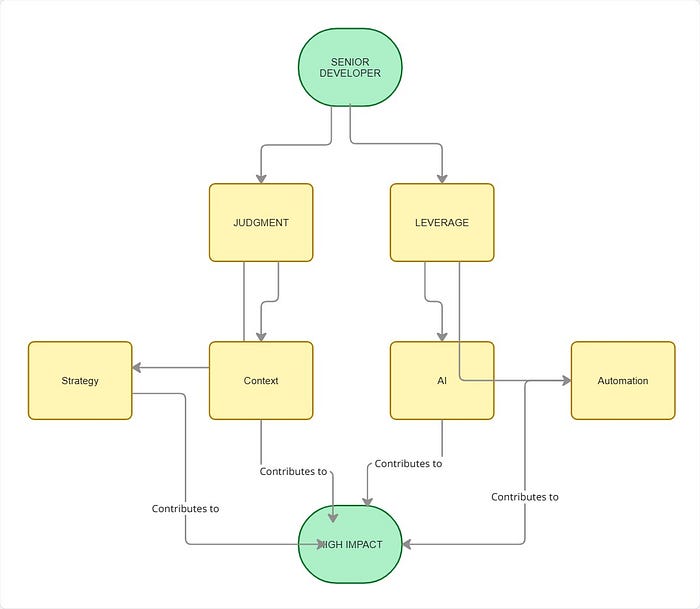
10. The Mental Model: Senior + AI
The Formula:
Impact = (Experience × Judgment) × AI Leverage

Where:
- Experience: Pattern recognition, system thinking
- Judgment: Trade-off evaluation, risk assessment
- AI Leverage: Acceleration, exploration, automation
Key Takeaways for Senior Engineers
✅ DO
- Use AI to challenge your assumptions
- Ask for multiple approaches and compare trade-offs
- Pre-review code with AI before submitting PRs
- Generate tests, but decide what matters
- Use AI for documentation and mentorship scaling
- Treat AI suggestions as starting points, not solutions
❌ DON’T
- Accept AI output blindly
- Let AI make architectural decisions
- Skip understanding the code AI generates
- Merge without manual verification
- Use AI as an excuse for lack of fundamentals
- Forget that you own the consequences
Conclusion: The Hybrid Senior Engineer
The future belongs to senior engineers who master the hybrid workflow:
Human Strengths: Judgment, context, experience, intuition, responsibility
AI Strengths: Speed, pattern matching, exploration, documentation, scale
The best senior engineers use AI not to avoid thinking, but to think better, faster, and at greater scale.
AI won’t replace senior engineers — but senior engineers who use AI will replace those who don’t.
Next Steps
- Try one prompt from this playbook today in your current work
- Pre-review your next PR with AI before submission
- Ask AI to challenge your next architectural decision
- Generate mentorship content for your junior teammates
- Measure the impact on your velocity and code quality
Remember: AI is not a shortcut. It’s a force multiplier for those who already know what they’re doing.